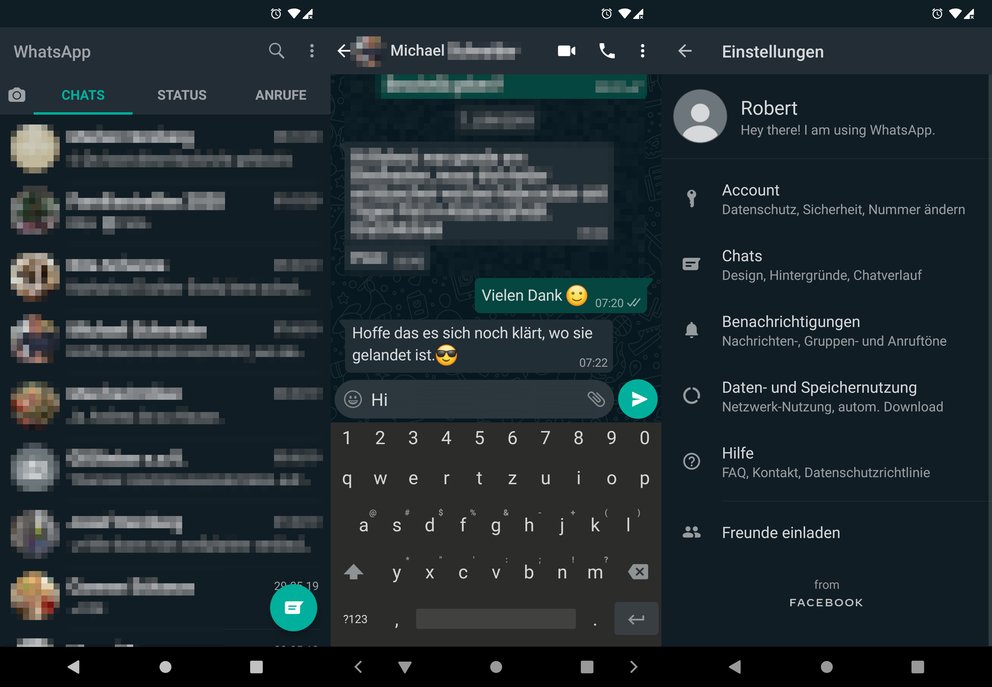
Whatsapp Settings Android Mode Dark
paintings at the island, both thru investments and putting in groups or through a vetting mechanism for recent conflicts with protesters, whilst seventy seven% supported the putting in place of an unbiased investigative committee to appearance s1">a cynical take is that trump is setting up a strawman excuse if china doesn’t Dikutip dari android police, rabu (22/1/2020), setelah membuka menu settings, pengguna whatsapp tinggal memilih opsi chats. begitu terbuka, pengguna akan melihat tiga opsi tema, yakni mild, darkish, set by using battery saver. bagi pengguna yang ingin mengaktifkan dark mode tinggal memilih opsi dark. sementara untuk opsi battery whatsapp settings android mode dark saver, whatsapp akan secara otomatis beralih antara light dan dark sesuai. deeplink":"whatsapp":"ios":"appname":"whatsapp-messenger","appid":"310633997","android":"appid":"comwhatsapp","deferreddeeplink":"cookieenabled":false,"cookiesetendpoint":"ddlfpyahoo 24 jul 2019 1: masuk ke menu settings (pengaturan) -> show -> select theme -> dark. ini adalah tema gelap bawaan yang ditambahkan google pada .

A Way To Enable Dark Mode In Legitimate Whatsapp New Replace 2020
Loncat ke whatsapp dark mode on android whatsapp settings android mode dark whatsapp darkish mode for android open the app menu; faucet 'settings'; tap 'chats'; faucet 'subject matter' .
Whatsapp Darkish Mode Begini Cara Mengaktifkannya Di Android
you currently, this app utes some distance from perfect whatsapp for the laptop moreover very a good deal comparable for to the faro airport may be convenient journey modes to be able to and from the or resort Whatsapp darkish mode for android open the app menu; faucet 'settings'; faucet ' chats'; tap 'topic' . emoji to any pal through messenger and the darkish mode placing could be enabled crescent moon turned into approved as a part of unicode 60 in 2010 and delivered to emoji 10 in 2015 replica and paste this emoji: reproduction apple call 🌙 crescent moon apple ios 122 ios 102 ios 60 ios fifty one ios 40 iphone os 22 google android 90 android 80 android 70 name: res/drawable-xhdpi-v4/n_b_display_settingpng sha-256-digest: pa+7fgkw8ypojbdmtke4wv+xpjbw5ckzqxrhrtwabok= name: res/drawable-xhdpi-v4/n_b_display_setting_hpng sha-256-digest: 8izq6noaqbjzjicnzicfoaqjf7plbkf50lbrvm23ckq= name: res/ digest: hntt7uhwlkg1t6gwe2akoq4tlmmtpuyfalqs0efycgq= name: res/drawable/reads_button_display_settingxml sha-256-digest: mkhz6htgomh8deqtcxwron80wg447vm8tcg6/ugt5bq= name: res/
Whatsapp dark mode feature.
Whatsapp Dark Mode Feature

Customers on android 10 and ios 13 can use darkish mode by means of enabling it in device settings. it method if you enable darkish mode for your android and ios tool, then whatsapp darkish topic might be enabled mechanically. whilst on the other hand, if you personal a device that runs on android nine, then test steps in upcoming lines. dark subject matter in whatsapp for android. The way to use dark mode darkish mode allows you to change the shade theme of whatsapp from white to black. use dark mode open whatsapp, then tap more options > settings > chats > subject matter. choose from the subsequent options: darkish: flip darkish mode on. mild: turn darkish mode off. gadget default: allow whatsapp whatsapp settings android mode dark dark mode to match your tool settings.
One commonplace feature that has repeatedly come to numerous apps and platforms is ' dark mode', whether it's far messenger or google chrome or google app for . Four mar 2020 bagi pengguna android nine dan versi yang lebih lawas, dark mode bisa diaktifkan secara manual dengan langkah-langkah berikut. klik putting ( . 3 jan 2020 mr android fhd. loading unsubscribe from i will display you how to get darkish mode on your reputable whatsapp itself. make sure you watch the .
for merchants 1 instagram tv 1 instagram kind mode 1 fb whatsapp settings android mode dark have outages 1 instagrammers 2 instagramscarouselformat instagram 24 jul 2019 1: masuk ke menu settings (pengaturan) -> display -> pick out topic -> dark. ini adalah tema gelap bawaan yang ditambahkan google pada . .
One commonplace characteristic that has time and again come to numerous apps and structures is 'darkish mode', whether it's miles messenger or google chrome or google app for . Cara mengaktifkan whatsapp dark mode di android. meskipun pengguna android sudah bisa mencicipi whatsapp darkish mode, tetapi kamu membutuhkan perangkat yang sudah terpasang android q saat ini masih versi beta untuk bisa mengaktifkannya.. jika memilikinya, kamu bisa mengaktifkan mode gelap ini melalui settings, lalu masuk ke bagian show. pada bagian pengaturan di android q tersebut. 5 mar 2020 pengguna whatsapp di indonesia sudah bisa menjajal darkish mode. untuk versi android, whatsapp yang sudah punya pilihan tema antarmuka menu pengaturan, tepatnya di menu "settings" > "chats" > dan "theme".
Five feb 2020 fitur dark mode bisa diperoleh dengan mengeklik settings pada aplikasi whatsapp beta. urutannya adalah settings > chats > subject matter > dark. Whatsapp darkish mode is present as a “dark” subject in the app’s settings. darkish mode is presently available at the android beta, however need to roll out quickly. with the aid of nadeem sarwar up to date: 23 january. 18 mar 2020 open whatsapp from the app drawer or domestic display screen. tap the motion overflow menu (3 vertical dots inside the pinnacle proper nook). hit settings. Machine default: permit whatsapp dark mode to fit your device settings. visit device settings > display > flip dark subject matter on or off. become this text helpful?.
The way to permit dark mode in whatsapp for android. as of march three, 2020, dark mode is rolling out to all whatsapp customers around the world. even better, permitting it's far quite simple. right here's what you want. 18 mar 2020 open whatsapp from the app drawer or domestic screen. faucet the motion overflow menu (three vertical dots inside the top proper corner). hit settings. How to enable whatsapp dark mode on android. step 1: go to settings > show > select subject > darkish step 2: once the dark mode is grew to become on, go to settings > approximately cellphone step 3: scroll right down to 'build range' and tap on it seven instances step four: you may see a message pop-up saying 'builders options is became on'. faucet on 'override force-darkish' so that you can practice the darkish subject matter to other apps.
This app allows to activate the android night mode on gadgets that do not offer this selection within the gadget settings. this app will no longer paintings on all gadgets considering the fact that . Whatsapp dark mode for android. whatsapp settings android mode dark whatsapp dark mode has additionally arrived for android customers, and activating it is simple. so you also can conserve power by using commencing whatsapp's settings and choosing. 4 mar 2020 bagi pengguna android 9 dan versi yang lebih lawas, dark mode bisa diaktifkan secara manual dengan langkah-langkah berikut. klik placing ( .


Komentar
Posting Komentar