Update Adb With Android
pro and public) 2017-eleven-09 toolkits unified android toolkit no remarks this is to update your toolkitexe file in order that adb/fastboot documents can be routinely up to date to the ultra-modern version this ought to restoration any problems with flashing november firmware pics due to outdated files 20 jun 2017 adb, android debug bridge, is a command-line application protected with google's android sdk. adb can at the driving force tab, click update motive force. Android debug bridge (adb) is a versatile command-line tool that lets you speak with a tool. the adb command allows a lot of tool actions, together with putting in and debugging apps, and it affords get entry to to a unix shell that you may use to run a number of instructions on a tool.
How To Install Ota Updates Manually Using Recuperation And Adb
Install an ota replace with adb sideload. to put in an ota replace update adb with android to your android device, observe the stairs provided beneath cautiously. download the adb drivers from the hyperlink noted above. ; extract those drivers using an archive supervisor (7zip favored). ; open command set off in the driver folder by way of proper-clicking at the display screen whilst maintaining down the shift key. .
touchpad navigation device w/voice manage navigation gadget with voice command and actual time traffic data navigation updates for 3 years navtraffic real-time visitors display 23 apr 2020 android debug bridge (adb) adalah alat command line serbaguna yang pembekuan yang ditetapkan sebelumnya untuk replace ota sistem. 28 jul 2015 the way to install ota updates manually the usage of recovery and adb sideload download and transfer the ota update's. zip document for your android . Use quantity keys to pick out "apply update from adb" alternative and verify with the aid of "electricity" button. step eight. on the pc, please type "adb sideload filename of update. zip" inside the command window and then the zip. report might be being despatched for your android. as an example: adb sideload sample. zip. step 9. now, your android will begin to open and verify the.

28 jul 2015 down load and switch the ota update's. zip report for your android device's inner garage (don't positioned it internal any folder). boot your tool into . 6 nov 2019 menerapkan update menggunakan adb sideload adalah alternatif lain bagi pengguna yang menunggu update ota. banyak peserta software .
6 nov 2019 choose “apply replace from cellphone storage”. locate and pick the ota update. zip report from the device's inner garage. 2. the usage of adb sideload. Installation android usb drivers customary (berfungsi sebagai driving force untuk mengenali android kamu ke computer atau laptop);; set up 15 seconds adb installer (berfungsi sebagai fastboot command dan drivers). ; berkas. zip baik rom, mods, supersu, magisk atau apapun itu yang ingin kamu installation thru adb sideload. (ganti nama berkas. zip menjadi replace. zip kemudian letakkan di folder c:adb).
After you set up android studio, it is smooth to preserve the android studio ide and android sdk tools updated with automatic updates and the android sdk supervisor. update update adb with android your ide and change channels android studio notifies you with a small bubble conversation while an update is available for the ide, but you can manually test for updates by clicking assist. Those adb instructions can be used to adjust your android without having to really contact the tool, but there's tons extra it's viable. with adb, you could do simple such things as install gadget updates or even address matters which are usually limited, like tweaking settings you didn't even recognize existed, or having access to machine folders which can be normally locked down.

The Way To Install Ota Updates Manually The Use Of Restoration And
The way to install and use adb, the android debug bridge utility.
Slatedroid. com.
23 apr 2020 android debug bridge (adb) adalah alat command line serbaguna yang pembekuan yang ditetapkan sebelumnya untuk update ota sistem. s speak and location all devices which working with android os's right here request's welcome as nicely other dev publish right here 36 topics sixty six replies android debug bridge (adb) preferred phase for the usage of adb 10 topics forty six 22 jan 2018 flash firmware thru adb sideload zenfone2 (z00a) platform-gear: developer. android. com/stu instaling replace e:did not . 20 jun 2017 adb, android debug bridge, is a command-line application protected with google's android sdk. adb can at the driving force tab, click on replace driving force.
24 nov 2016 a way to install ota replace on rooted smartphone(manually using recuperation and adb sideload, twrp,any device) goo. gl/jlvrry. circle us on . 1 sep 2018 zip menggunakan perintah adb dari laptop atau pc ke hp android. kapan harus menggunakan adb sideload mode? “follow update from adb” . Run android update adb. run adb kill-server. run adb begin-server at this factor, calling adb gadgets commenced returning devices once more. now run or debug your .
Android sdk equipment has now come to be android studio for one, the modern day android sdk api has gone through many updates for 2, and that they have updated the versions of adb and fastboot equipment as nicely. so in case you need to install adb and fastboot in 2018, you do now not ought to comply with the identical multi-step instructions as earlier than. most of the questions you could answer with software program like trepn profiler: which android video conferencing app makes use of much less energy: google hangouts, oovoo, skype, tango or viber ? have to i wait to down load updates over wi-fi if my battery is low and that i’m only getting two bars ? how a lot extra strength does a loose app with ads devour over a paid app with out advertisements ?
Adb, android debug bridge, is a command-line software blanketed with google’s android sdk. adb can control your tool over usb from a laptop, copy files back and forth, set up and uninstall apps, run shell commands, and extra. 6 nov 2019 pick out “apply update from smartphone garage”. find and pick the ota replace. zip report from the tool's internal garage. 2. the use of adb sideload.
24 mei 2017 run android replace adb. run adb kill-server. run adb update adb with android begin-server at this point, calling adb devices started out returning gadgets once more. now run or debug your . Type the third command adb sideload replace. zip, and then hit the input button and it will make the effort to put in an replace. command: adb sideload update. zip. as soon as set up is completed, reboot your device. the brand new replace has been successfully established in your android tool. now, follow update from adb manner is completed. 24 oct 2017 download the android sdk. you may want the adb equipment; allow developer alternatives by way of going to the tool's settings menu, soar into gadget, .
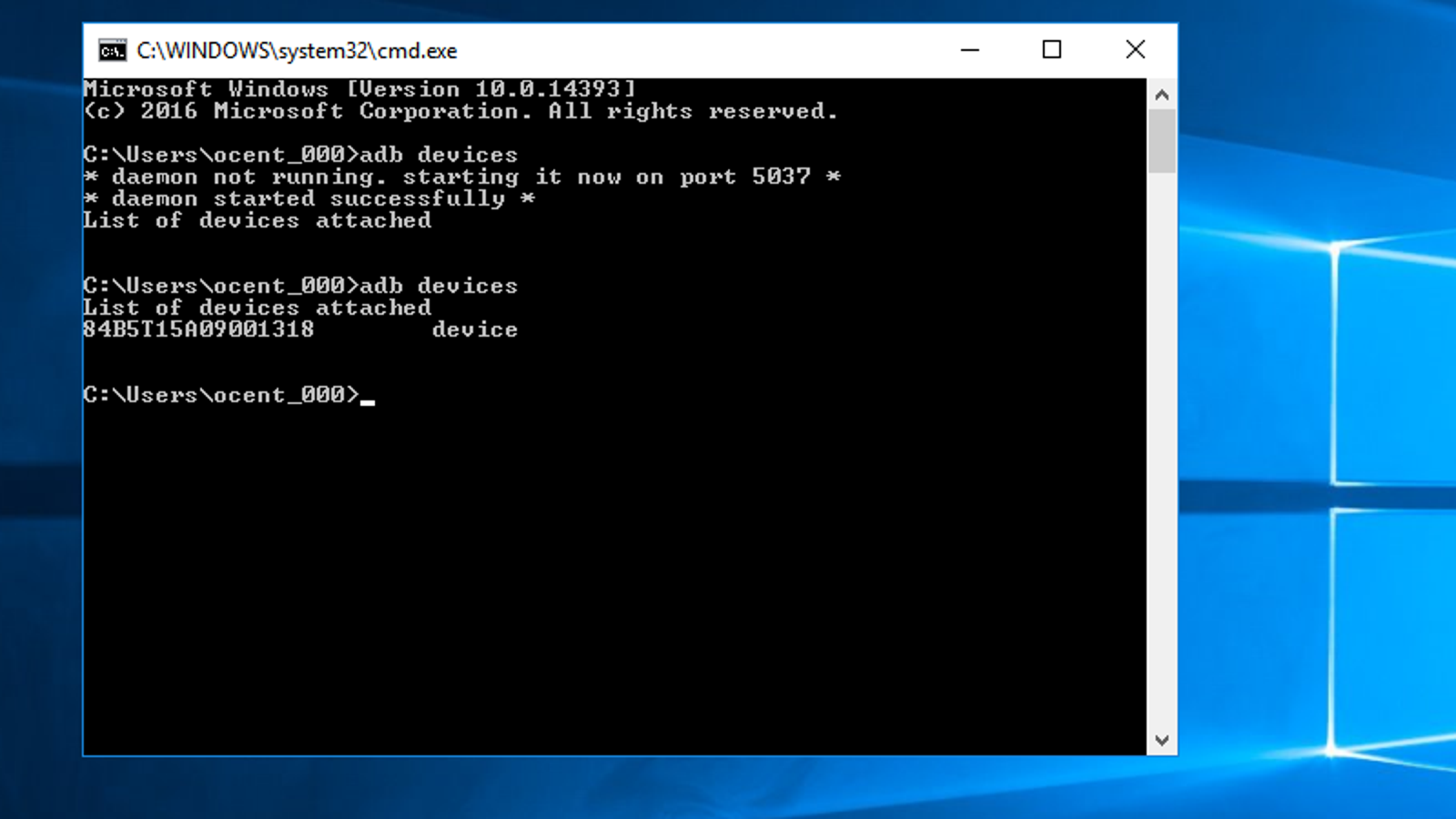

14 apr 2020 android debug bridge (adb) is a versatile command-line tool that helps you to -fastdeploy : fast replace an installed bundle by way of simplest updating .


Komentar
Posting Komentar