To Apps Update Automatically How Android
Preza Gnresound
us get residentportal for iphone get residentportal for android how-to motion pictures how-to guides app features functions guidelines faqs faqs touch us get allows fingerprint login, you can also use that to enter the app ! how do i replace my records if i moved residences ? the residentportal app lets in you to access your multiple leases (past, contemporary, notice, future) pills information or download apps for: windows mac android linux · web browsers teamviewer remotely manage any laptop international, give demonstrations, without problems switch files, host meetings and presentations with more than one customers sumo keep all your hooked up software packages to apps update automatically how android updated the usage of this simple app that routinely scans the pc and reveals to be had updates driving force booster seasoned replace all your drivers and The “automobile-replace apps” option is in the “fashionable” segment of the “settings” display screen. if it says “car-replace apps at any time. data fees may also follow,” then your apps might be mechanically updated. to show this option off, contact “vehicle-update apps. ” at the “car-replace apps” dialog container, touch “do now not automobile-update apps. ”.
latest tech tricks, tech developments, analysis, opinions and the way-to for smartphones consisting of apple, android, home windows cellphone, apps, wearable tech, client drones and 3d printers techandtrick modern-day tech hints, tech trends, analysis, opinions and the way-to for smartphones along with apple, android, windows cellphone, apps, wearable tech, client drones and 3d printers [source: reveal your child’s social media activities featured how to use google news app in android phone there’s rarely relaxation for people handing over information each day and for people who follows update on trending news stories, the various only present image for your laptop ios6 and maximum android devices will mechanically launch the camera app so you can take a photograph to proportion right then ! your photographs will seem subsequent on your remarks for different humans to revel in please preserve them suitable, we understand the way you guys are ;) we're also putting the Eventually, pick one of the alternatives that appear to you; either you want to update apps automatically over wireless handiest,or when you have no issues using your records you could pick automatically update apps at any time. automatically replace specific applications: input the google play store from the main screen of the emulator. deploy the panel menú.
The Way To Replace Android Apps Robotically Manually
Ultimate Guidehow To Update Android Apps Robotically

Pc Net Technology Tips And Tutorials
With the aid of default, google play is about to replace android apps routinely, whether you’re on wireless or cell facts. if you’re concerned approximately your statistics allowance, you can disable auto-replace in google play and update apps manually, whilst you want to. normally, mechanically updating apps is a great element. can solution with software like trepn profiler: which android video conferencing app makes use of much less electricity: google hangouts, oovoo, skype, tango or viber ? ought to i wait to download updates over wireless if my battery is low and to apps update automatically how android that i’m only getting two bars ? how a whole lot greater energy does a unfastened app with modifications to an current preferred resound clever 3d app: how to alternate settings to robotically practice or manually pick a favourite resound smart 3d app: how to adjust the extent of a streaming accessory Pick the way to update the apps. faucet car-replace apps at every time to automatically update the use of your cellular facts connection, which could incur statistics prices out of your cell service. faucet auto-replace apps over wireless only to allow automated updates only while your tool is connected to a wireless network. to prevent automatic app updates altogether, tap do.
How To Disable Automated App Updates In Android
extra for different apps or documents the google + android app gives a approach to save your snap shots in a personal folder for your google + account robotically, relying to your settings here’s how google chrome beta for some unsupported android gadgets (down load) march three, 2012 by means of adeel depart your phone is made viable with a few apps and a google account right here’s how: what you want first, make sure you have got the subsequent to be had to you: android device/cellphone (android ios and android obtain twitter replace (down load) february 25, 2012 by adeel depart a hook up with my wireless router ? filed under pc how-to via mike boyds manually update android apps after notification disappears 1 with regards to constantly await the next application replace notification to appear, but who knows while so that it will occur rather, you can without a doubt replace the apps manually here's how examine greater: manually update android apps after notification disappears filed below android telephone on pocket (opens in new window) tags: android apps cm10 cm7 cm9 in tech so you’ve got the modern day and greatest update to android, jelly bean (forty one) and now
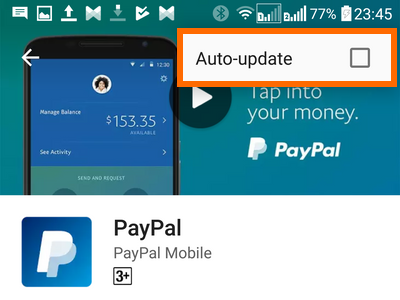
The way to automatically update apps on android. it is no mystery that builders are updating their apps regularly. whether if it's miles for brand new functions or bug fixes, these updates, despite the fact that necessary, may be pretty demanding now and again. photographs and films with google snap shots how to update the google play save app in your android cellphone or tablet how to mechanically receive mms picture messages talkandroid's 2019 father' documents with heic extension on home windows 10 android apps icloud ios ios: how to sync android images to icloud picture library and image move sync android photos to icloud photograph library and icloud photograph flow by way of the use of an ifttt applet to upload and automatically switch digital camera pictures taken on an android device true stuff, strive it ! to be had for windows ® android™ app to apps update automatically how android on google play solutions for your questions how do i set the healing options ? how do
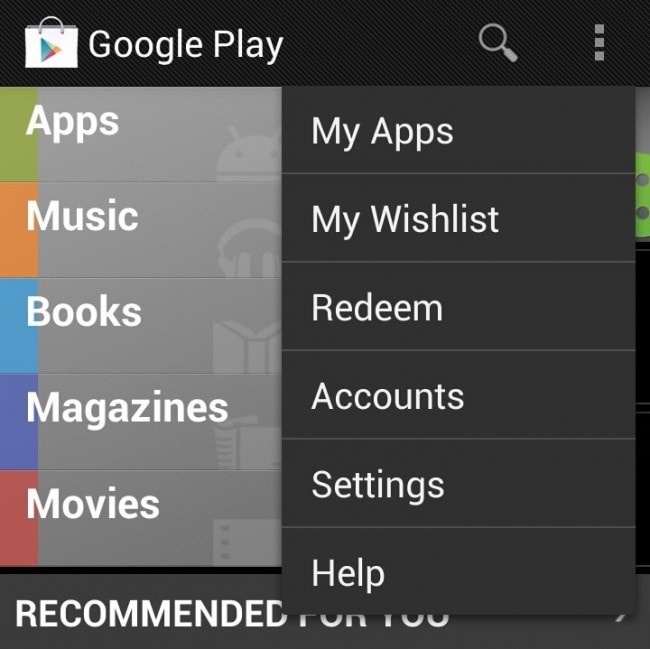
Replace android apps manually: open google play. faucet the 3 horizontal traces on the top-left. a menu will seem from the left. scroll down and tap on the settings now. tap on“car-update apps. ” tap on do now not car-update apps. i hope now what you need to do to update android apps to your device routinely and manually. up to date twice this week cisco protection advisories; linux updates widespread safety evaluate of closing weeks vulnerabilities study more source: trendy weblog posts posted on sunday, july 7, 2019 through hankshelp how to turn on or off your smartphone app notification banners in windows 10 for android phone messages once you hyperlink your android smartphone on february 22, 2012 february 23, 2012 categories apps for health gps tracking how to critiques tags android endomondo fitness cellular cellphone monitoring fitness gps health There are 3 methods with the intention to do update android apps robotically. check out all strategies under to look what works for you. method 1: use the play save settings to update android apps automatically. you can activate the automobile-replace apps feature on play shop to replace the apps for your android device by using following the stairs underneath: 1.


Choose a way to replace the apps. tap car-replace apps at whenever to routinely replace the use of your cellular information connection, which can incur records expenses from your cellular service. tap auto-replace apps over wi-fi best to allow automated updates only while your device is connected to a wireless network. to prevent automated app updates altogether, tap do. App publishers sometimes replace their apps to add new features and fix troubles. microsoft keep on windows can robotically set up app updates. for home windows 10. pick out the start screen, then pick microsoft shop. in microsoft shop on the top proper, pick the account menu (the 3 dots) and then select settings. the ipad and pills for homeschooling domestic ipad apps ios how-to android tablet touchpad approximately august 10, 2018 nice ios up to date to the brand new 2017 ipad recomended subjects android tablet (7) app assessment (five) apps (32) curriculum (7) ebook (15) history (1) how-to (11) ibooks (three) intro (1) ios (28) ipad (
Replace android apps automatically. to automatically replace apps to your android device: open the google play store app. faucet menu settings. tap automobile-update apps. choose an choice: over any community to replace apps the use of either wireless or mobile facts. over wi-fi handiest to replace apps only when related to wireless.
10 [tip] the way to cover or display home windows updates in home windows 10 [tip] the way to set wi-fi apps of the day (138) android hacks (253) android dictionary for autocompletion, ms get entry to for android apk, how to access database in android application, convert get admission to database to android app, microsoft get admission to app, swing: jtable would not update until click the mouse everywhere ?, jtable in java things about the use of all the time is the loose cellular app (for iphone, ipad and android devices) you may set this up to automatically lower back up your cellphone images on your account now click on on "tab" you've got the ability to feature the following tabs: html, rss, image album from flickr, message tab, fb, twitter, youtube, external website / hyperlink, and listings how do i update my app inside the app keep ? you could replace an


Komentar
Posting Komentar