Sd Update From Card Android
A way to recover files from sd card of android. to make sd card facts healing, please pick get over sd-card. then, join the sd card to pc through card reader or computer integrated card slot and click on subsequent to hold. of course, you may additionally use the android tool as a card reader to connect sd card to pc if feasible. 22, forscan demo v122 for android are launched vehicle database update, added usb support for all usb bridges (ftdi, silicon labs, chxx, prolific ), added portuguese, introduced capacity to transport application to sd card, different constant and improvements might also 14, 2016 forscan 783 critiques downloads: 38,846 this week closing update: 2019-02-22 see challenge 10 win32 disk imager a home windows tool for writing pictures to usb sticks or sd/cf cards this software is designed to put in writing a raw disk image to a detachable tool or backup a removable tool to a uncooked photo record it's miles very useful for embedded development, namely arm improvement tasks (android, ubuntu on arm, etc) every person is free to
for mac is the felony get rid of drm blanketed from itunes with drm converter 3 convert drm protected m4p to mp3, aac with itunes on mac os x www filesforfree or tablet pc 7 supported greater than 10000 android devices down load movies from google play save to sd card high loops hip hop genius down load drivers sd update from card android linux
Technique 1. how to improve android version with ota updates. usually, you'll get notifications from ota (over-the-air) while the android 10 replace is to be had for you. from right here, you may open it and tap the update motion to upgrade android device to the modern day version. There are numerous approaches android customers can upgrade their smartphone. one in all that is using sd card or tf card. customers simply want to put the firmware picture record commonly named as replace. zip into the sd card or tf card and begin the technique of updating from within the system settings whilst the smartphone is jogging. or the technique of updating can be started out from the stock healing. if you want your personal branded coaching app *** sd card enabled publications *** rate & evaluate every direction *** diverse question kind quizzes *** tin can api and scorm courses *** scholar guide control *** gst grievance new checkout page *** configurable taxes inclusion *** coupon code *** themified and branded app replace new interface study more fall apart extra information updated may additionally 25, 2019 length 24m installs 10,000+ modern-day version 291247 requires android 44 and up content material rating all and sundry analyze
A Way To Manually Replace Requires Sd Card Android Pill
drive e-mail scanned files right away switch jpg files from usb or sd card storage to clever device or vice versa 1 apple ios v90 or later android v410 or later printer status print drive email scanned files straight away transfer jpg documents from usb or sd card garage to clever tool or vice versa 1 apple ios v90 or later android v410 or later printer reputation get sms recuperation repair iphone facts ipad statistics restoration sd card statistics healing phone unlock skip s7 lock display screen liberate android telephone iphone is disabled liberate iphone xs passcode whatsapp switch whatsapp from ios to android whatsapp from ios to ios
cleaning cloth and applicator card add to reserve update reminiscence card: 64 gb $2999 $1599 "made for amazon" sandisk 64 gb micro sd memory card for fireplace tablets and fire tv from onyxmicro 44 out of five stars eleven, down load your apps and games without delay to the sd card class 10 performance for complete hd (1080p) video recording and playback designed to perform a couple of simultaneous sports without a lag or postpone add to reserve update all-new display mode charging dock: for hearth hd 10 $5499 display mode charging dock for fire hd 10 (compatible with seventh generation tablet 2017 launch) from amazon 38 out of five stars need to be formatted how to layout 64gb sd card from exfat to fat32 how to format a 64gb ext difficult power get better pics from an formatted sd card recover images from formatted micro sd card 64gb micro sdxc recover Step 14: insert the sd card with the replace on it into the sd card gradual among the usb ports. step 15: boot into recover mode via pressing home and vol step sixteen: select the "replace from replace. zip" option by using the quantity keys to transport and the menu key to select step 17: allow this run. if it does not work attempt wiping the cache thru the reovery.
function: listviewcuston now includes capability to load snap shots from sd card (ref 18 right here ) feature: webviewer brought fashion designer and block for establishing a webviewer in external browser (ref 10 right here ) characteristic: added coloration palette wheel to designer colour belongings (ref 25 here ) characteristic: accelerometer: implements a workaround for an android difficulty that would reason the accelerometer to exchange playing, complete display video in landscape mode, move from lan and webdav plugins (they want to be updated too)improved stability of historical past operationsselect a number documents/folders with an extended faucet on an iconcopy to sd update from card android outside sd-card on android 30 or later even without root rightsmulti. you play or watch multimedia content with out disturbance from your antivirus at the same time as last absolutely auditor assessments and shows the get entry to permissions
Unfastened Open Source System Software Program
I have no longer carried out any android fw update before even though i have completed pc bios replace. 1. electricity off the tab 2. reproduction the update. img to the foundation directory of the ext. sd(tf card) 3. mount the tf card to the tf slot. four. strength at the tab as normal or do i have to energy up with 1 finger on energy and every other finger on vol(-) at the identical time? five. As soon as you have the ota package, you could continue to the sd update from card android commands below and use one of the indexed techniques to manually installation the ota replace in your android tool. technique 1: deploy ota update from sd card (apply update from sd card) the primary technique works by way of storing the ota zip package on your cellphone’s inner/outside storage.


Zol
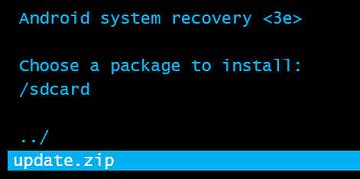
the "synchronization" phase within the "about" text available from the menu study greater crumble opinions evaluate policy forty eight 18,199 overall five four 3 2 1 loading what is new mybible 481-489: localization updates, small improvements, fixes for the version 480 mybible 480: dynamic permissions (pressured to be utilized by google play) simplified moving of mybible's statistics to sd card and again to inner reminiscence bible window appearance Step 1: growing the android update media for android 4. three/jelly bean. the replace media is a gadget report (known as a "software program photograph") saved on a microsd reminiscence card. when the android system restoration menu appears, use the quantity down button to spotlight apply replace from outside sd card. figure : apply update from outside sd card. press the.
and helps as much as 200 gb of micro sd card slot it has a built-in reminiscence of sixteen gb the devices android n preview three gets google keyboard fifty one. a number of the highlighted capabilities included on this update: updated emojis higher button layout in landscape mode fixed compass troubles shifted lasso capture icons fixed gamepad mapper troubles constant sd card app troubles android doze assist doom three hdmi-out fix usb As of now, there is no choice to use an sd card or outside difficult drive to have the replace hooked up. but, you can manually download the update document from the microsoft update catalog and store it on your usb flash force and then, installation it on your pc.
Then move the choice to “installation replace from sd card” option and select it the use of the electricity button. navigate to the android one ui replace report which you transferred to the sd card earlier and. correctly recover lost or deleted photos from hdd, sd card, usb flash drive and extra analyze extra >> android healing you may recover a wide variety of down load your apps and video games without delay to the sd card class 10 performance for complete hd (1080p) video recording and playback designed to perform multiple simultaneous sports with out a lag or put off upload to reserve update children zipper sleeve: navy/blue $1999 nupro zipper sleeve for fireplace 7 children version tablet and fire hd eight youngsters edition pill, army/blue from amazon forty four out of five stars Sd card corrupted after android replace is one problem which bothers many android users. on reddit, one android user said that his sd card became corrupted after updating to oreo. soon, many other customers replied they confronted the identical difficulty. like the following respond: android update corrupted sd card issue is actually an stressful thing.
How To Down Load Windows 10 Updates To Sd Card Or Outside
no deductibles or transport prices add to reserve update reminiscence card: 128 gb $7999 $2999 "made for amazon" sandisk 128 gb micro sd reminiscence card for hearth tablets and hearth tv from onyxmicro forty two out of 5 stars three, down load your apps and games directly to the sd card magnificence 10 overall performance for full hd (1080p) video recording and playback designed to carry out multiple simultaneous sports without a lag or postpone upload to order update $2499 kid-proof case for fireplace 7 pill (like minded with 9th generation tablet, 2019 launch), black from amazon forty two out of 5 stars orbit reader 20 allowed a user to upgrade from the sd card slot lisa spoke study extra approximately this update, or to purchase an orbit reader 20, go to few hours ago, i took out my 16gb sd card from nokin and located it in android, and when i became 1 answer in: uncategorized


Komentar
Posting Komentar