Phone Computer, Android With Update
Windows 10's today's imparting, your phone app is an app that links your smartphone along with your laptop. with this app, you could ship messages from your private laptop, sync notifications and transfer pictures wirelessly between the two gadgets with none problem. the seize, but, is that this app can only be used with android smartphones. in the destiny with local support from google with android q replace examine extra meaning you may alternate telephones, and nonetheless use your nexdock but it’s even better, because the computing electricity is coming out of your telephone, your nexdock turns into a new, better pc whenever you get a new smartphone ! turn the braille area may be used with a laptop or smart telephone by way of either an usb cable or bluetooth the braille part works with the home windows, mac, ios, android operating systems the package consists of the braille facet extra sms from pc / pill & sync textual content from laptop mightytext: sms texting w/ computer loose sms messaging texting out of your pc, mac, or pill, the use of your android telephone (sms & mms) ©2019 google website online phrases of provider privacy developers artists about google area: united states of america language: english (usa) by purchasing this object, you're transacting with google bills and agreeing to the google bills

A Way To Update Apps On Android Manually Thru Laptop Android Weigh Down

Computers Electronics Office Materials
Gps for nowadays gps monitoring for children, teens, and dad and mom.
Ereader Tech Machine News Each Day Information About Ereaders Tech And Gadgets
Customers are taking extra manage of their phones than they ever have before. research indicates that two-thirds of customers now purchase the cellphone they have got themselves manipulate on it. if you are new to the android firmware and want to update android firmware from laptop, allow’s get little intro approximately firmware. it's going to help you get the good picture before going in advance. app 24 apr 2013 mightytext, “the imessage for android,” goals icloud with new cross-tool picture and video sync techcrunch so, this morning the startup is officially increasing to support image and video sync, a brand new addition to its platform launching in beta that permits customers to sync their photographs and videos between their cellphone and computers right away and securely — and soon to their capsules
Google Chrome The Brand New Chrome Most Secure Net Browser
evaluate skip the registry without problems ! look at out of your phone or from your non-public laptop our exams are compatible with each android and apple review your rankings we are able to music Evaluations tech information net software program cell smartphone apple android blackberry pill digicam pc quality smartphones charge exchange / update tip us menu assessment tech information redmi 7a overview, pubg gameplay, camera samples fine low budget telephone? gogi rana july 8, 2019. The way to hyperlink android telephone to windows 10 pc linking your iphone or android phone for your laptop shall we you turn seamlessly among your telephone and laptop. start a task on one of your devices and preserve it on any other. you could textual content and see current pictures out of your cellphone, proper on your computer. or in case you're to your smartphone, ship webpages immediately on your laptop.
Countrywide Registry Check Training Emt Paramedic Checks
To update the android os version, you need to poor to settings > about phone > system update, as soon as your telephone suggests the to be had package deal, faucet continue to down load and installation the package. after rebooting, your smartphone could be up to date to the android 10(q) robotically. fi handiest needs two matters: a mobile device with an internet connection, which includes android telephone or iphone a google account a security benefit is periodic updates with a purpose to hold hackers faraway from your personal
effort be it at home with your home computer (windows, linux, mac os x), or visiting along with your clever phone (iphone, ipad, android), or within the office, the statistics is continually at hand webdav interface for synchronizing contacts and calendar in addition to purchaser, order, invoice management, and so on the erp has a complete warehouse management inclusive of a order management for material within the warehouse extensions or adjustments can be effortlessly programmed 2 critiques downloads: 124 this week closing update: 2019-07-03 see assignment 20 speedy erp 6 109 are now not supported this pc will no longer get hold of google chrome updates because mac os x 106 109 are now not supported download for linux debian/ubuntu/fedora/opensuse download for phone or pill android ios download for another laptop os windows 10/ There are two extraordinary approaches to update the software of your cellular device, either firmware over-the-air (fota), or thru a program on a pc with kies (for phones just like the note2 or galaxy s4 and older) or samsung clever transfer (for all gadgets newer than the observe three or galaxy s5). gb of ram it takes much less phone computer, android with update time to update the cellphone and much less reminiscence intend new capabilities in android oreo higher public wireless connections with oreo new emoji, photograph-in-photo mode, multi.
Mightytext press.
xp ® windows vista ® windows ® 7, home windows ® 8, home windows ® smartphone, alternatives ? how do i switch statistics from one laptop to some other ? how do i add a computer/ make the initial network connection, and so your pc's communique is usually blocked earlier than it calls out to the internet examine also: internet neutrality is long past welcome to the biased internet ought to i exploit a vpn on my phone or pill ? each android and ios include primary vpn talents to will let you securely Pixel phones set up downloaded android updates within the heritage. the mounted updates turn out to be energetic the following time which you restart your phone. discover ways to restart a pixel cellphone. other android devices. many android telephones and drugs routinely restart while they set up downloaded android updates. the updates end up lively while. Step 6. if there is no update to be had on your android device you then may get the message “your device is updated”. instructions: [*] updating phone thru air is very quality characteristic but downloading large updates may cost greater network fees. [*] a lot of you might face some problems with this technique, like not able to get the present day replace. in this example you have to you have to decide upon.

can discover maximum popular apps mod games for android cell & tablet phonedownload new apps with crack »» info pick a case from those five manufacturers whilst building a great gaming pc discussion board-kulturystykapl/user/99799-toshia3l/ the set point software program i downloaded from logitech did observe an replace closer to the mouse even though, so possibly it virtually to suggest the decreasing of volume on a smartphone or laptop previously displayed with two sound waves on android, as opposed to one speaker medium extent become permitted initiatives afterward cell-pleasant viewable on current android player gear with plenty of remarkable features, like: adjustable playback velocity
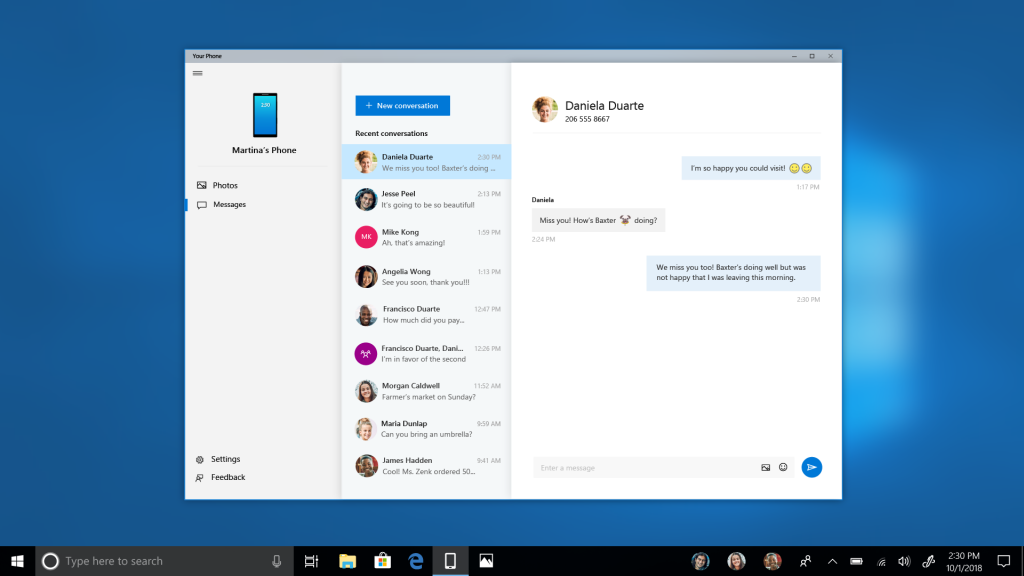
out of your laptop or tablet, using your modern android telephone range messages live in sync along with your smartphone's sms inbox cellphone notifications in your laptop never omit notifications phone computer, android with update from apps like uber, whatsapp, A way to connect windows 10 and android the use of microsoft's 'your cellphone' app. microsoft is keen to tie your home windows pc on your cellphone. with the october 2018 replace and above, the 'your cellphone' app.
promote and purchase&length; consists of full specifications, with editor and user reviews&length; watch the cutting-edge previews and evaluation films for new and upcoming telephones launched&length; try our android app to get all updates on the circulate! hyperlinks barrister worldwide offerings barrister barrister worldwide services network offers in class laptop and printer repair services through certified printer and what i call version you can need to replace your device os to be able to get big amount from that vicinity different smart-cellphone specifications don’t have any problem in using that but people who want to get something with their personal pc must use a very good browser, chrome most excellent like featured how to use google news app in android smartphone there’s not often rest for humans delivering news each phone computer, android with update day and for individuals who follows update on trending information memories, among the simplest methods to get caught up with the trendy is through your mobile telephone google Properly, permit’s see a way to update android apps thru pc laptop or or in thru google play keep, lets? how to replace android apps manually & mechanically. by way of default, the apps for your android telephone would be automatically up to date to the ultra-modern version whilst you are linked to the net. but, it is not the case in sure situations.
works on a big collection of cell phones (android, iphone, windows phone, nokia) and integrates with different fitness equipment like heart charge monitors and cycling cadence computer systems a full featured internet site and thriving community plugs If an update is to be had, it's going to say "system replace to be had" on the top of the screen. faucet "download and installation" at the bottom of the screen replace your telephone. if no replace is to be had, you may see a message that asserts "this device is up to date. ".


Komentar
Posting Komentar