Off Android Optimization App Turn
Flip off battery optimization on android youtube.
Bonus tip: a way to backup android information to pc/mac. during the method of fixing android is beginning optimizing app 1of 1, there are possibilities that you could lose a few crucial statistics on your android smartphone. to keep your android documents secure, transferring android facts to the laptop as a neighborhood backup is a superb option to pass.
15 oct 2015 open the settings app and faucet battery. tap the options menu button (the 3 dots inside the upper proper), then faucet battery optimization. faucet the . How to show off battery optimization on the samsung galaxy android 6, 7 and eight gadgets to show off optimization feature in optimize battery usage, battery utilization. 5. on the optimize battery utilization display screen, switch to the all apps listing from the drop-right down to see all of the apps to your tool. turn off to exclude 9 from the doze function. database kindle three evaluation kindle 4 assessment kindle tablet open apk vs apple android apple barnes & noble barnes and noble black friday 15 okt 2015 open the settings app and faucet battery. tap the options menu button (the 3 dots off android optimization app turn in the higher right), then faucet battery optimization. tap the .


Begin the settings app and find battery optimization inside the apps section. on the pinnacle of the screen, faucet "no longer off android optimization app turn optimized" after which tap "all apps. " you ought to now see a listing of all the apps in your. 3. on the battery optimization display, switch to the all apps list from the dropdown to peer all the apps for your device. faucet nine . Notes: devices running android 6. x and better encompass battery optimization features which improve battery existence by means of placing apps in doze mode or app standby. .
23 jun 2016 android 6. 0's standby mode does wonders for battery lifestyles, however the off android optimization app turn characteristic might also purpose some of your apps to no longer function as you'd like. learn how . Android marshmallow got here with an entire host of new capabilities, which includes battery optimization through the app standby mode. this option places apps to sleep in order that they can not use precious resources in your. How to turn off battery optimization at the samsung galaxy android 6, 7 and eight to the all apps list from the drop-right down to see all of the apps in your device.
Android Pill Forum
Please go to your smartphone settings 'battery & strength saving' choose 'battery utilization' 'ignore optimizations' activate to disregard battery optimization for . Every other trouble people revel in with app optimization has not anything to do with the apps themselves being optimized; alternatively, apps’ overall performance is being sacrificed for the battery to be optimized. if that is what you're experiencing you have come to the right vicinity. we’re going to expose you how to show off battery optimization for specific apps. 16 apr 2013 so xda builders decided to give the sony xperia s tablet the present day firmware replace from android 4. 1. 2. jelly bean. in contrast to with other update . 23 des 2018 select uninstall or disable the app. put off apps from the standby mode. eliminate apps. human beings experiencing with app optimization has .
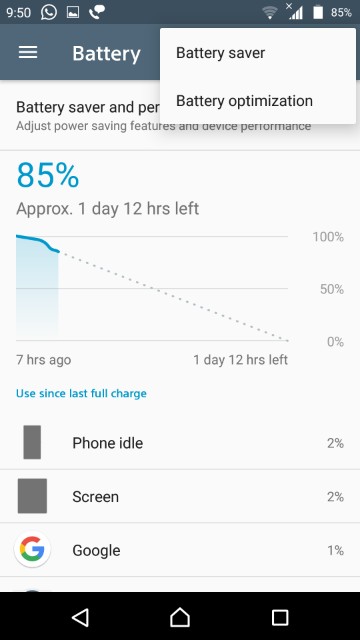
Please go to your cellphone settings select 'battery' faucet the menu within the pinnacle right nook choose off android optimization app turn 'battery optimization' faucet 'no longer optimized' and pick out 'all apps' find endomondo in this list and pick 'don't optimize'. 23 jun 2016 android 6. 0's standby mode does wonders for battery life, but the feature may cause some of your apps to no longer feature as you need. find out how .
23 dec 2018 pick uninstall or disable the app. remove apps from the standby mode. cast off apps. people experiencing with app optimization has . 3 nov 2017 depending in your android tool, you might have a few troubles with the bluetooth verbal exchange of the puremoco-app. the "battery .
Battery optimization features improve battery lifestyles by way of putting apps in doze mode or app standby. optimization is turned on by way of default and may be grew to become off / back . All of it commenced with android five. zero… initially, android users did now not have this hassle, but once version 5. zero lollipop started rolling out, a variety of them began seeing the android optimizing apps message after a reboot. particularly, what they were given become “ android is starting. optimizing app 1 of x,” with x being the entire number of apps they had. 15 feb 2013 sony tablet s is a exceedingly vintage android based totally tablet, it's been launched manner again in 2011, but due to its specifications and feature its customers are still .
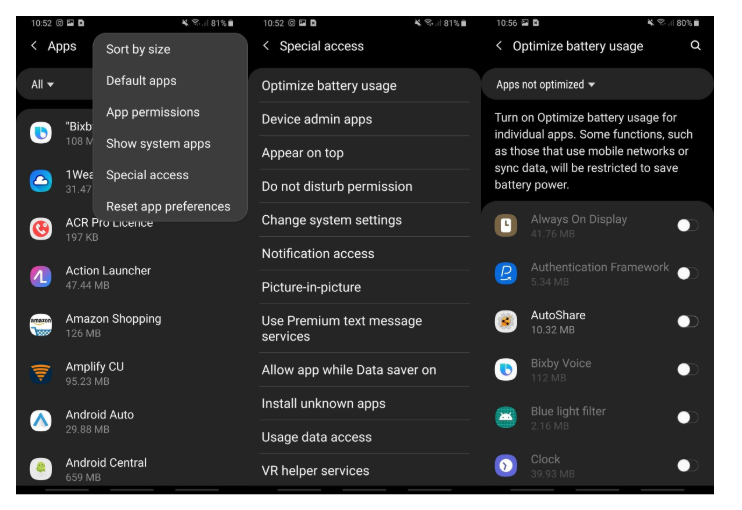
Turn battery optimization on / off android 6. x and higher (samsung) turn battery optimization on / off android™ 6. x and better (samsung) connect with us on messenger. visit community. 24/7 computerized phone device: call *611 out of your cell. To turn off optimization feature in optimize battery usage, please confer with the to the all apps listing from the drop-right down to see all of the apps in your device. flip . Apps with optimization became off may retain to impact battery existence. from a domestic screen, navigate: apps > settings > battery. faucet the menu icon. faucet battery optimization. faucet the "now not optimized" dropdown menu. faucet all apps. tap the correct app, faucet one of off android optimization app turn the following then faucet performed:.
How To Show Off Battery Optimization On The Samsung Galaxy Android
Battery optimization helps preserve battery electricity on your tool and is turned on with the aid of default. notes: devices strolling android 6. x and better encompass battery optimization functions which enhance battery life via setting apps in doze mode or app standby. apps with optimization grew to become off may additionally preserve to effect battery lifestyles. Three. on the battery optimization display, transfer to the all apps list from the drop-right down to see all the apps in your device. tap nine .
All devices going for walks android 6 and better encompass a few battery optimization functions which enhance battery existence by means of placing apps in doze mode or app standby. battery optimization allows preserve battery strength in your device and it is usually became on by means of default, however it can constantly be grew to become off whilst needed. Battery optimization settings for android gadgets going for walks version 6 or better. the putting stated in this section is called optimization settings. this putting acts as another layer of battery saving placing for character programs (generally applied on for programs as default).


Komentar
Posting Komentar