Do To I Android 5ghz My From Change 2.4 Ghz How
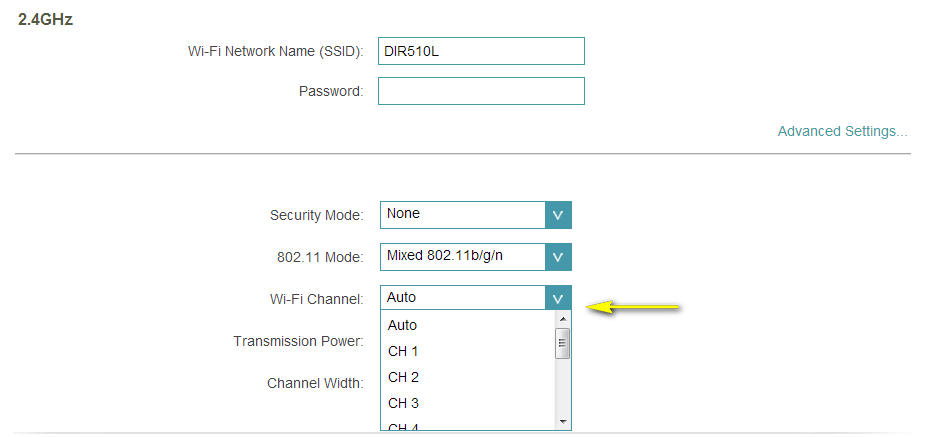
23 agu 2016 after android 7. zero, does absolutely everyone know how i can trade my preferred wifi also, are you able to now not separate the two. 4 and five ghz bands for your router?. How do i alternate my wifi from 5ghz to two. 4 ghz? click on on settings. input the admin password. click on at the “advanced settings” tab, then click on retain to superior settings. click at the “wi-fi” tab. to manually pick the wireless channel for the “2. 4 ghz” band: you may do the equal on the 5ghz page to trade your 5ghz wi-fi channel. This may show you how crowded 2. 4ghz and 5ghz are. to exchange the relationship kind (band) to 5ghz we want to access the router settings. the following approach gets you to the login page of do to i android 5ghz my from change 2.4 ghz how your router, however from there you'll want to comply with your precise router manual, because every router is different.
The way to exchange desired band (2. 4 ghz or five ghz) for.
Is my wifi 2. 4 ghz or 5ghz? any other way to inform, with out searching up your wireless router version, is to look at your wi-fi community’s call (ssid). each router will call the two. four ghz and 5 ghz bands in another way, but you may usually inform simply by searching. as an example, the 5 ghz community may additionally have five, 5g, or 5ghz as part of its name. Eleven jul 2018 they use the same ssid for both the 2. 4ghz and 5ghz band networks. some android devices assist you to specify the band as well. to that network, once it's far related you could hold putting in your zencam camera.
Now tap on wireless frequency band and pick out the band from 2. 4ghz and 5ghz. how you can join do to i android 5ghz my from change 2.4 ghz how your cellular tool to a 2. 4ghz network. as you would possibly understand, . Pick the favored radio band. as soon as related on 2. 4 ghz, use the app to setup you smart tool. transfer your android returned 5 ghz. approach 2 (android 7 . Tip: the waves of the two. 4 ghz band can tour a more distance than the ones of the 5 ghz band. if your telephone does no longer have the ability to replace wi-fi bands, try to .
How To Inform When You Have 2 4 Ghz Or 5 Ghz Wifi

Now faucet on wi-fi frequency band and choose the band from 2. 4ghz and 5ghz. how you may connect your cell device to a 2. 4ghz network. as you would possibly recognise, . 19 dec 2015 twitter: twitter. com/itvraag instagram: www. instagram. com/itvraag/ patreon: www. patreon. com/itvraag almost all home wifi . How do i change my wifi from 5ghz to 2. 4 ghz? click on settings. enter the admin password. click on on the. 1 feb 2019 hello david,. there is now not an alternative in the pixel settings menu to force a connection to a selected band, and the cellphone will generally opt for 5ghz .
Quick Answer How Do I Change From 5ghz To Two Four Ghz
Wi-fi adapters can run in 2. four ghz or 5 ghz, which additionally refers to as bands in windows. if you're experiencing problems with your wireless connection, you may try to specify the desired band. whilst one might assume 5 ghz is better, the fact is that 2. 4 ghz can cowl larger regions or even. A frequency band refers to a particular frequency range inside which signals can be despatched. wlan waves may be transmitted thru the 2 frequency bands 2. 4 ghz . In case you want to trade desired wifi band to 5ghz in windows computer, then this video is for you, i'm able to display you grade by grade on the way to manually transfer wifi among 2. 4 and 5ghz bands. 23 aug 2016 after android 7. zero, does all of us understand how i can trade my preferred wifi also, can you now not separate the two. 4 and five ghz bands on your router?.
Three. select 2. 4ghz or 5ghz from the pinnacle bar within the app, look for the community a number of the names. four. if your community shows up in the 2. 4ghz, then it is a 2. 4ghz community. technique 4: the usage of a windows computer. 1. connect with the wifi community. 2. open your networks panel out of your taskbar (click the wifi icon within the bottom right). do to i android 5ghz my from change 2.4 ghz how 3. 23 mar 2016 the wireless settings for your android tool are really worth tweaking. icon, then faucet superior and toggle off the community notification setting. now, pick a band: both 2. 4ghz (slower, but longer variety) or 5ghz (quicker, however shorter .
app apk the present day version of our moodle app for android can be acquired from the google play keep (advocated) in case you are not able to access the shop, you can download the android package package (apk) (requires android forty or above) download apk final changed: tuesday, 28 august 2018, 9:23 pm the moodle undertaking approximately announcements community forums get concerned moodle companions moodlemoot moodle do to i android 5ghz my from change 2.4 ghz how customers association examine 37 browse by way of language downloads contemporary release plugins moodle app moodle computing device demo faculty sandbox tracker browse issues . 3 feb 2019 a way to alternate from 2. 4ghz to 5ghz ▻▻▻subscribe for greater: www. youtube. com/user/britec09? sub_confirmation=1 in case you want to . Android four. 0 brings a unified ui framework that we could builders create elegant, progressive apps for phones, capsules, and extra. it consists of all of the acquainted android three. x interface elements and apis — fragments, content loaders, action bar, wealthy notifications, resizable domestic display screen widgets, and extra — in addition to new factors and apis.
How Google Nest Wifi And Google Wifi 2 4 Ghz And 5 Ghz
How do i exchange my mac from 5ghz to 2. 4 ghz? after you’ve separated the 2. 4ghz and 5ghz networks, you need to tell your mac and ios gadgets to join 5ghz in preference to two. 4ghz. in macos, visit the community pane in machine possibilities, click on on wi-fi, then the superior button, and drag the 5ghz community to the top of the list. 按一下「下載」,然後遵循提示安裝閱讀程式。 ipad/iphone版請點此下載 ,或於app store搜尋「zinio」 android(40↑)版本請點此下載 ,或於play商城搜尋「zinio」 步驟3:購買「今周刊電子雜誌」 歡迎透過今周網站>電子雜誌專區 > 選購您要訂閱的商品[購買時所填寫的email帳號,必須是您註冊zinio時的email帳號] 專區網址:wwwbusinesstoday tw/list-content-80429 完成訂閱並繳款成功後,即可收到由zinio系統發出的下載通知信。 訂閱中如尚未出刊新一期雜誌,將於出刊上架後,寄發下載通知信。(今周電子雜誌為每週四晚上出刊) 三、下載zinio閱讀軟體 請直接點選下載: twzinio /www/apps/desktopjsp ?_requestid=18973 四、常見問題 如何購買電子雜誌? 請上今周刊選擇您想要的方案,
That has both 2. 4 ghz & five ghz bands wifi with the the 5ghz ssid performing beginning with ''5ghz-'' and the two. 4 ghz ssid beginning without the ''5ghz'' prefix. you simply ensure your puppy cam connects to the ssid that does't begin with the ''5ghz'' prefix. you shouldn't want to change some thing on the router. How do i pick out my 2. 4 ghz band community? from your telephone's wi-fi settings page, study the names of your wi-fi networks. a 2. four ghz community can also have "24g," "2. 4," or "24" appended to the quit of the network call. as an example: "myhomenetwork2. 4" a five ghz network may additionally have "5g" or "five" appended to the give up of the network name, for example.
The frequency band is changed at once at the router: enter the ip address 192. 168. 0. 1 for your net browser. leave the user field empty and use admin because the password. select wireless from the menu. within the 802. eleven band selection field, you could select 2. 4 ghz or 5 ghz. click on observe to store the Pick out the desired radio band. once linked on 2. four ghz, use the app to setup you smart tool. switch your android lower back five ghz. method 2 (android 7 . Any recommendations on the way to alternate my telephone to visit the 2. four and now not the 5 so i will get this app to paintings? 06-08-2018 06:35 am. like 0. hallux's avatar. 10,258. Any guidelines on the way to exchange my smartphone to go to the 2. 4 and no longer the five so i'm able to get this app to paintings? 06-08-2018 06:35 am. like zero. hallux's avatar. 10,258.


Komentar
Posting Komentar