Dark Android Apps All 9 Mode
Jun 18, 2020 · android 9. zero (pie) introduced an choice to toggle between dark and light subject matters, however the procedure is a little distinct than android 10. to permit darkish mode on android nine: launch the settings app and tap show. For android nine. zero pie and better. if you have the modern day smartphone jogging on android 9. zero pie, switching to a dark theme is probably no problem at all. after numerous client requests, google has subsequently enabled guide darkish issues in android nine. zero pie (scalable to better versions within the destiny). Jul 20, 2019 · use this distinct manual to learn how to allow dark mode on google apps. for years now, the android community has cried out for darkish topics in programs and the machine at some point of, all at the same time as google persevered to slap increasingly white topics basically everywhere. See extra movies for android nine darkish mode all apps.
A Way To Pressureenable Darkish Mode For All Apps In Android 10
Android nine. 0 (pie) added an choice to toggle among darkish and light subject matters, however the manner is a little extraordinary than android 10. to allow dark mode on android 9: launch the settings app and faucet display. Mar 05, 2020 · step 5: choose dark to spark off dark mode in android p 9. zero. this android pie darkish topic is useful to increase battery lifestyles to your device. additionally, set the mild topic in android p nine. zero in case you don’t want to like a dark topic. if you alternate wallpaper in android 9. zero with the intention to affect your android pie subject. a way to trade wallpaper in android 9 pie. Darq is an app that we could customers permit a forced dark mode on a in line with-app basis on android 10. it now works without root thanks to using an adb script.
Google rolled out gmail darkish mode remaining year, however its usage is confined to android 10 via the worldwide toggle button. the customers on android nine and versions before are still helpless. Mar 09, 2020 · on ios, you may toggle darkish mode in this way in ios 12; on ios thirteen, you need to set off gadget-wide dark mode. telegram messenger on android (left) tap the three-dot menu and choose settings.
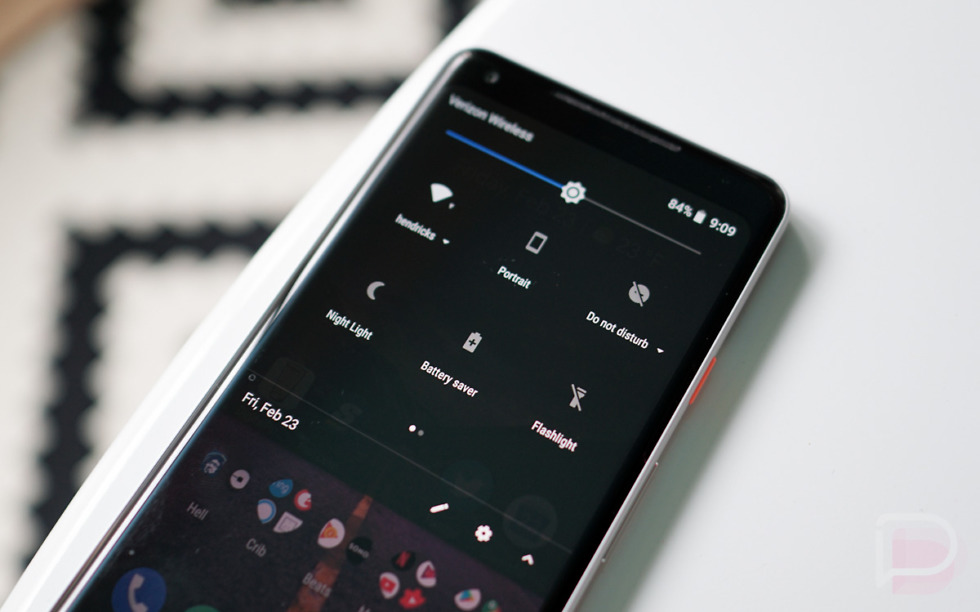
On android nine, the settings menu and other interface factors, like the notifications that pop up beneath the fast settings, stay tinted to a mild subject matter along with a white historical past and black textual content. but, in case you know a way to alternate your android wallpaper, you could pair darkish mode with a lighter wallpaper for a greater steady revel in. Use this detailed guide to learn how to permit darkish mode on google apps. for years now, the android network has cried out for darkish subject matters in applications and the system at some point of, all at the same time as google persisted to slap increasingly white issues essentially everywhere.
What Is Android Darkish Mode And The Way To Permit It
The reliable android messages app has a lot of capabilities, however the app additionally supports automatically switching along android 10's dark subject matter, in addition to having a darkish mode you may manually enable. The darkish mode update arrived with model 2. 1 of the app and respects android 10’s gadget-huge darkish mode. significantly, it capabilities a true-black topic. extensively, it functions a real-black theme. google. The dark mode replace arrived with version 2. 1 of the app and respects android 10’s machine-extensive dark mode. drastically, it features a true-black subject. considerably, it functions a true-black subject. google. dark android apps all 9 mode Android 10 also added a device-extensive darkish mode on apps that guide it after google realized the advantages of dark issues on top rate oled displays. google’s first-celebration apps on android were.
A Way To Allow Darkish Subject On Any Android Phone Make Tech
The way to pressure-allow darkish mode for all apps in android 10.
Google Darkish Mode App Roundup The Entirety Available To This Point
The legit android messages app has numerous capabilities, however the app additionally supports mechanically switching along android 10's darkish subject, in addition to having a dark mode you could manually enable. Android 10 additionally introduced dark android apps all 9 mode a machine-extensive darkish mode on apps that support it after google found out the benefits of darkish issues on premium oled presentations. google’s first-celebration apps on android have been. Google added its legit darkish mode to android 10 no longer lengthy ago, but it would take some time for all apps to support the brand new characteristic. that does not suggest you have to wait around for each app developer to add dark mode — just observe this manual to find out how you could pressure all apps in android 10 to apply darkish mode.
The legit android messages app has a lot of functions, however the app also supports routinely switching alongside android 10's dark topic, as well as having a darkish mode you can manually enable. Step 3: tap advanced. step four: scroll down up to tool theme and faucet on it. by using default android p subject matter set as automated (based on wallpaper).. step five: pick out dark to activate dark mode in android p 9. 0 this android pie dark topic is useful to extend battery life in your device. also, set the mild subject in android p 9. zero if you don’t want to like a dark subject matter.
How To Show On Darkish Mode In Android Nine Pie Bestusefultips
Step five: select dark to set off darkish mode in android p nine. zero. this android pie dark theme is beneficial to increase battery lifestyles in your tool. also, set the mild subject matter in android p 9. zero if you don’t need to love a dark topic. if you change wallpaper in android nine. 0 so as to have an effect on your android pie topic. how to exchange wallpaper in android nine pie.
On ios, you could toggle darkish mode in this manner in ios 12; on ios thirteen, you want to activate device-huge darkish mode. telegram messenger on android (left) faucet the 3-dot menu and choose settings. Google delivered its official darkish mode to android 10 now not long ago, but it would take a while for all apps to guide the new feature. that does not mean you need to wait round for every app developer to add darkish mode — just comply with this guide to learn the way you can pressure all apps in android 10 dark android apps all 9 mode to apply darkish mode. Between night time mode and the tool subject, you’ll be the use of dark mode anywhere it’s possible on android. that is, other than apps that use independant modes which include google play games.
Permit gadget extensive dark mode (android pie) the inventory android pie nine. 0 comes with a help of machine-huge darkish topic. while it’s handiest operating at the telephones with inventory android or with the pixel telephones. in case you’re using samsung galaxy on one ui you could additionally enable it. right here’s how. for notification panel; open your telephone’s gadget settings. Jan 10, 2020 · google rolled out gmail darkish mode last year, but its usage is limited to android 10 thru the worldwide toggle button. the users on android 9 and variations before are nevertheless helpless. Google brought its reputable darkish mode to android 10 no longer long ago, however it'd take some time for all apps to aid the brand new function. that does not mean you have to wait round for each app developer to add darkish mode — simply follow this manual to learn how you can pressure all apps in android 10 to use darkish mode.
The motives for apps to undertake a dark subject go on from there, and we’re happy to look darkish mode finally arriving on google apps. despite the fact that google doesn’t yet provide a system-wide dark mode for its take on android, the employer has been busy updating its apps to consist of dark mode. Dec 17, 2018 · among night time mode and the tool subject, you’ll be the usage of dark mode anywhere it’s possible on android. this is, aside from apps that use independant modes along with google play video games. Between night time mode and the tool subject matter, you’ll be using dark mode anywhere it’s feasible on android. that is, aside from apps that use independant modes which includes google play games.
What's android dark mode? and how to enable it.


Komentar
Posting Komentar