Crashing Android Apps Keep
Eight Brief Ways To Restore Apps Preserve Crashing On Android Imobie
20 feb 2018 if the apps for your android tool start crashing time and again, crashing android apps keep it may be a irritating revel in. besides that, even though, it can sincerely be a . “apps preserve crashing android” and “apps crashing android” are amongst the most normally searched terms on google these days. we apprehend that android is an top notch os and could be very popular with users as it allows us to download, set up and run numerous programs, now not handiest from the google play shop but also from other unknown resources.
29 jun 2018 good day gina,. thank you for posting in the google photographs support network. i understand and i know how essential google images is for you. Jan 18, 2020 · similarly to these solutions, keep the subsequent things in mind to ensure that your android device plays well and the apps run easily: hold the capability of your phone in thoughts while installing powerful apps. in case your telephone is constructed for common use, you could now not be able to run heavyweight video games and apps that could take a toll at the processor.
Step To Repair An App That Keeps Crashing On Android
Way 6: wipe cache partition to restore apps crashing on android problem way 7: manufacturing facility reset to restore apps maintain crashing on android problem. manner 1: reboot android telephone to repair apps preserve crashing on android difficulty. in loads of instances, application crashes on android issue has been noted to be constant either permanently or quickly by using restarting device. The very best manner to repair an app that keeps crashing for your android phone is to in reality pressure stop it and open it once more. to do that, go to settings -> apps and choose the app that continues crashing. Apps can crash or freeze on iphones and ipads, simply as they could on another platform. apple’s ios operating device disguises app crashes via ultimate the app. if you’re experiencing crashing, freezing, or buggy apps, right here’s how you could restore your trouble.
An android app crashes on every occasion there’s an sudden go out due to an unhandled exception or signal. an app that is written the usage of java or kotlin crashes if it throws an unhandled exception, represented by using the throwable elegance. an app that is written the usage of native-code languages crashes if there’s an unhandled signal, together with sigsegv, at some point of its execution. The tactics that may be opened at the side of the apps that preserve jogging within the background will near once you restart your tool. that manner, you will unfastened up the memory that might were clogged. your device will carry out smoother. in case you observe the apps maintain crashing or freezing after the reboot, pass to different solutions. “apps keep crashing android” and “apps crashing android” are among the most normally searched phrases on google nowadays. we recognize that android is an fantastic os and is very popular with customers because it permits us to down load, set up and run various applications, not only from the google play save but also from other unknown assets.
Stop Apps Crashing On A Samsung Cellphone Samsung Guide Australia

A way to restoration android apps last through themselves (routinely.
One after the other, do away with recently downloaded apps. discover ways to delete apps. after ea ch removal, restart your phone commonly. see whether or not eliminating that app solved the trouble. crashing android apps keep after you put off the app that caused the trouble, you may add again the other apps which you eliminated. discover ways to reinstall apps. Similarly to these answers, hold the subsequent things in thoughts to make sure that your android device performs properly and the apps run smoothly: hold the capability of your cellphone in mind when installing effective apps. if your phone is constructed for average use, you could no longer be capable of run heavyweight games and apps that may take a toll at the processor. Apr 29, 2015 · a new android system update can be in charge for common app crashes on positive smartphones and drugs. each bgr and droid existence record that a new version of android system webview a aspect "that allows android apps to display net content," is probably main certain programs -like the famous textra messaging app -to crash.
Among the users are complaining that chrome maintains crashing on their android gadgets. in case you additionally appear to be one of these users and you are unwell of chrome maintain crashing to your device, we've got were given a few techniques to repair the issue for you. like many different apps for your tool, chrome additionally saves records and cache files in your tool to serve you. Nine mar 2020 the answer for app preserve crashes to your smartphone i'm a developer of iphone/android and my app keeps crashing on users phones…. If you have this hassle in which apps maintain ultimate to your android device, there are quite a few answers you may attempt out. the motives apps crash. before diving . Thus, when you face the apps maintain crashing on android difficulty, you can attempt to check or reconnect the network to fix it. to get an amazing community, you can: flip off the wireless connection to your telephone after which press and keep the strength button to reboot the device.
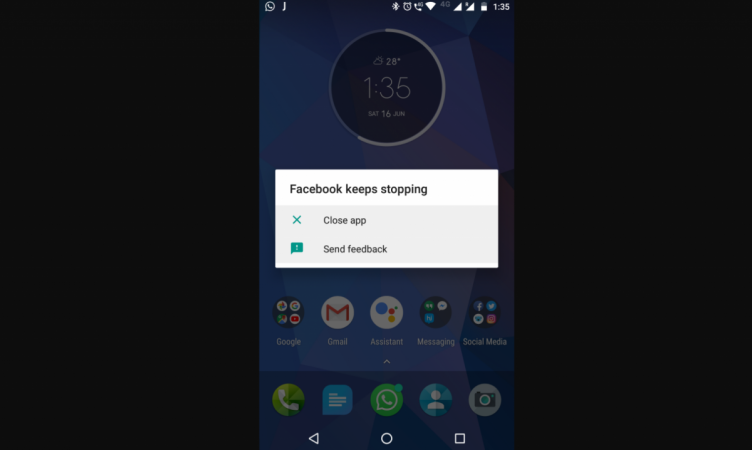
Forestall apps crashing on a samsung cellphone ultimate changed : jun 03. 2020 if you're seeing a popup for your tool that *app name* keeps stopping and you've already tried each the alternatives at the popup to shut the app and send comments, please have a study the alternatives indexed under inside the dropdowns. Mar 20, 2020 · the procedures that can be opened in conjunction with the apps that maintain running inside the background will near when you restart your tool. that manner, you will loose up the reminiscence that could were clogged. your device will carry out smoother. if you note the apps hold crashing or freezing after the reboot, flow to other answers. Component 2. how to restoration apps preserve crashing on android tip 1. force forestall crashed app. the maximum commonplace approach you could try to clear up your hassle is to force prevent the crashed apps. right here are the distinct steps. step 1. go to settings > apps and discover the app that continues crashing. step 2. input app data, and faucet on “force forestall”. Way 6: wipe cache partition to repair apps crashing on android issue way 7: manufacturing unit reset to restoration apps maintain crashing on android issue. way 1: reboot android smartphone to fix apps keep crashing on android difficulty. in a number of instances, application crashes on android problem has been cited to be fixed both permanently or temporarily through restarting tool.

Generally, the apps have to work properly any time as you want. but, now you locate positive apps maintain crashing now and then for no apparent cause, that's pretty worrying. don’t fear, this manual will help you fix the android apps preserve crashing trouble fast. you will locate the motives as well as answers here. allow’s get it on. part 1. Why do my apps preserve crashing android? this may be because of many motives consisting of corrupted os, inadequate garage space. no matter for what reasons, tenorshare reiboot for android gives one tap method to repair android device to repair app crash troubles with 100% success. Hence, when you face the apps maintain crashing on android problem, you can try to test or reconnect the network to fix it. to get a great community, you could: turn off the wi-fi connection in your smartphone after which press and keep the power crashing android apps keep button to reboot the tool.
A new android system update may be accountable for common app crashes on sure smartphones and drugs. each bgr and droid lifestyles document that a new edition of android machine webview a issue "that allows android apps to show web content," is probably main positive programs -like the popular textra messaging app -to crash. Prevent apps crashing on a samsung phone last modified : jun 03. 2020 in case you're seeing a popup for your tool that *app name* continues stopping and you've got already tried both the options at the popup to shut the app and send comments, please have a look at the alternatives listed below within the dropdowns. 21 feb 2020 in case you apps maintain crashing after replace to android 10, make sure to reboot your smartphone, clean app's cache and statistics, or reset your tool to . See extra motion pictures for android apps keep crashing.
18 jun 2020 how to restoration android apps preserve crashing hassle? this guide will tell you eight answers to restore this issue. Part 1: repair android gadget to restore apps preserve crashing on android -100% fulfillment. why do my apps maintain crashing android? this may be due to many motives together with corrupted os, insufficient storage space. irrespective of for what motives, tenorshare reiboot for android affords one tap approach to repair android machine to fix app crash problems with.
Step to fix an app that continues crashing on android business.


Komentar
Posting Komentar