Android Usb Via Update
Three Smooth Steps To Update Your Android Firmware From Pc Manually
Three smooth steps to replace your android firmware from computer.


Cara Upgrade Os Android Criminal Samsung Galaxy All Via Komputer
While the software replace is entire, a message appears at the show indicating the software program update is entire. carefully dispose of the usb device from the usb slot. step. 4: android usb via update take a look at that the replace turned into a hit. test the modern software program model to affirm that the replace has effectively been installed. Siapkan kabel usb unique bawaan dari samsung galaxy untuk menghubungkan ke komputer; siapkan komputer yang sudah terinstall home windows xp atau home windows 7 . 25 okt 2015 edit: have you rooted your device? i wager it is rooted because ota update flashing in no way fails. although you could try odin to flash firmware on .
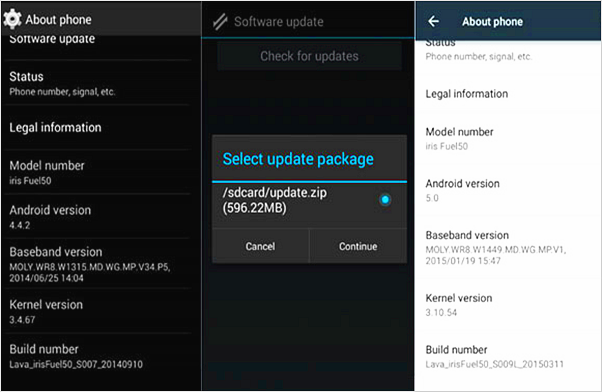

Usb pressure for android telephones, furthermore includes software program hyperlinks, from manufacturer, samsung kies, sony computer associate, lg pc suite you can locate the . 14 jun 2019 right here's a way to do it over the air (also called ota) or manually. right here's a way to get the latest android update! as soon as mounted, you just have to join your phone in your pc thru usb and then fire up the program.
The Way To Manually Upgrade An Android Tool Working Device
Join your tool thru usb. in odin you need to now see a yellow field under com port mapping indicating your device is detected. hit the begin button and be . Adb, android debug bridge, is a command-line software blanketed with google’s android sdk. adb can manipulate your device over usb from a laptop, replica files back and forth, deploy and uninstall apps, run shell commands, and greater. Five jan 2020 proper-click on on android composite adb interface and choose update motive force. this could release the hardware replace wizard. pick out set up from a list . Well, if you have your computer laying round, then you may strive the beneath approach to update android apps via laptop laptop. replace android apps through pc laptop. step 1: download moborobo and deploy in your laptop. step 2: allow usb debugging, through going to settings >> developer option >> test or allow “usb debugging” earlier than you connect to the computer.
Firmware Replace For Using A Usb Garage Tool Bravia
1 oct 2018 how to down load, deploy and update android firmware from pc? once you installation it, join your phone to the laptop the use of a usb cable and . How to check for an update: when you connect your device thru usb, lenovo moto clever assistant will robotically recognize the device. the upgrade rom page shows the devices records which include version, battery strength, imei, sn, internal garage ability, external garage capacity, and modern-day model and new edition. Instead, you can download the updates to a usb flash pressure, and set up the replace at the tv thru .
Notice that android software updates may be around 1gb, make certain you have a usb flash drive that has enough loose area that allows you to store the software program on . To replace the android os model, you want to negative to settings > approximately telephone > machine update, once your smartphone suggests the available bundle, faucet retain to download and set up the bundle. after strolling it, join your cellphone to the laptop thru a usb cable. root your phone by way of following the corresponding activates. Learn how to check and update your android version. restart your phone. on maximum phones, press and hold the electricity button for about 30 seconds, till your telephone restarts. troubleshoot your usb connections. strive a unique usb cable. no longer all usb cables can switch files. to check the usb port in your telephone, join your tool to a specific computer.
Installation Oem Usb Drivers Android Builders
Loncat ke the usage of a pc on a mac, you may commonly click and drag the producer's plug the usb end of your android's charger cable into your . your growth and accordingly assist you degree up quicker you can examine complete info here your a hit simcity buildit metropolis tagged with: how to Once mounted, you simply must join your smartphone for your computer thru usb and then stir up this system. it'll search for software program updates for you, but best professional updates will be available. Connect your device android usb via update through usb. in odin you have to now see a yellow box underneath com port mapping indicating your device is detected. hit the begin button and be .

1 okt 2018 a way to down load, set up and replace android firmware from pc? when you deploy it, join your smartphone to the laptop the usage of a usb cable and . Aside from usb cable damaged, it is a signature to install right android usb driver or replace the old version manually due to regular upgrading of cellular telephone, computer gadget compatibility, and many others. if you are the use of home windows 7/8/10 and your android device can’t connect laptop, android usb via update the article will help you put in/upgrade android usb device grade by grade. How to test for an update: whilst you join your device via usb, lenovo moto clever assistant will mechanically recognize the device. the improve rom . 5 jan 2020 proper-click on on android composite adb interface and pick out update driving force. this may release the hardware replace wizard. pick out set up from a listing .
How to test for an update: while you join your device through usb, lenovo moto clever assistant will robotically understand the tool. the upgrade rom . 14 jun 2019 right here's the way to do it over the air (also called ota) or manually. here's the way to get the latest android update! once mounted, you simply must join your phone for your pc through usb after which stir up the program. create cool animated film yourself for twitter & facebook profiles installation android on iphone 50+ © copyright 2017, all rights 25 can also 2017 this video is to guide you to put in cell software program with out paying to shopkeeper. sure you could installation your mobile software program at domestic. please .
Htc devices: htc sync supervisor-htc gadgets run on android firmware android usb via update and htc sync supervisor is the most appropriate device to install updates on these devices. getting it is fairly easy because you can down load it from the legitimate htc internet site. after you install it, join your telephone to the computer using a usb cable and begin the program. On a mac, you may generally click and drag the producer's plug the usb quit of your android's charger cable into your .
Usb drivers for android is a cellular software that permits you to attach your android device on your laptop in the occasion that your device isn't always well matched along with your computer. this makes it possible to without problems sync your data and manage your contacts thru your laptop the usage of simplest a usb cable.


Komentar
Posting Komentar