Android Programmatically Force Mode Dark
In case you need to disable force darkish for specific perspectives, you can do so by adding a android:forcedarkallowed characteristic to the view inside the xml. you can also use setforcedarkallowed to accomplish that programmatically. for simple apps, pressure darkish would possibly work well sufficient. but even as you could use it as a brief solution until you properly put into effect the darkish topic, it’s no longer enough for plenty apps. Apps should choose-in to force darkish with the aid of putting android:forcedarkallowed="real" inside the hobby's subject. this characteristic is ready on all the machine and androidx furnished mild topics, which include subject. cloth. mild. whilst you operate force darkish, you need to make certain to test your app thoroughly and exclude perspectives as needed. if your app uses a darkish subject matter (inclusive of theme. fabric), pressure darkish will now not be applied.
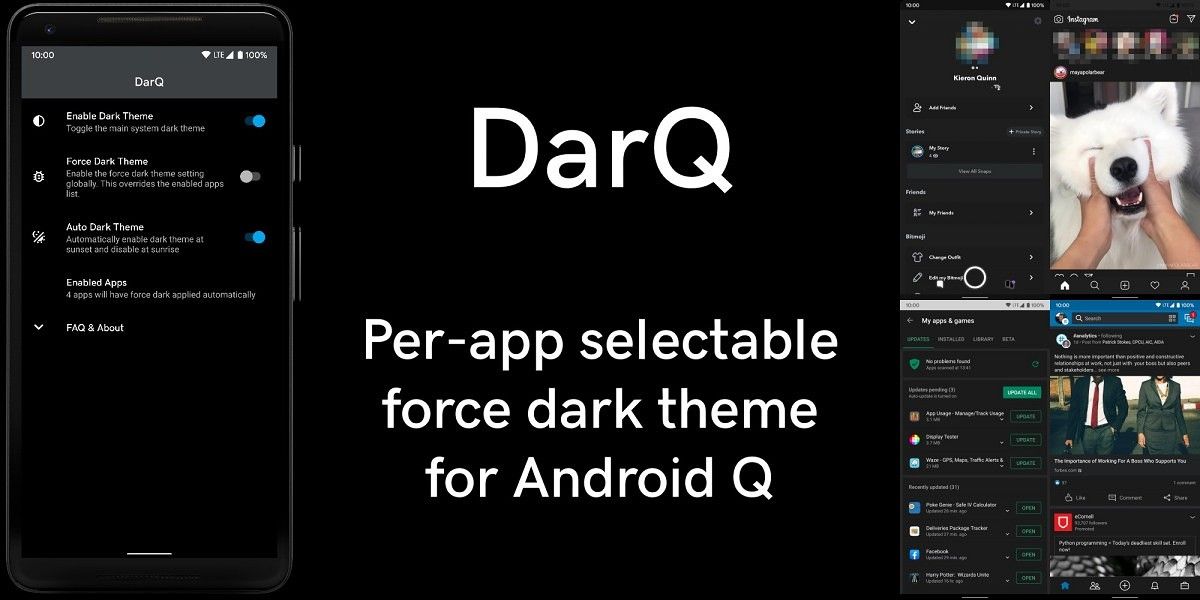
Jul 01, 2019 · darq android programmatically force mode dark lets you toggle android q’s force dark mode on a consistent with-app basis [root] while google rolled out android q beta three for the pixel gadgets, they included a neat developer choice to pressure the darkish. To enable dark mode on whatsapp and different unsupported apps, all you have to do is permit developer alternatives in your android 10 tool, after which scroll down to the “override force-dark” putting and. With android q launched by using google, darkish subject changed into released with it. darkish mode applies to each the device ui and the apps jogging in it. before beginning permit's understand why we wished the dark subject, can reduce electricity utilization by using a enormous quantity. some device manufacturer permit dark mode by default to the person. To force darkish mode across all apps, you want to allow a specific developer putting for your device. you will want to locate the developer options to your machine settings, which is hidden by means of default. the technique can range slightly, so hit up the guide below to learn the way you can do this on your device.
May additionally 30, 2019 · night time mode developer choice (settings->device->developer options->night mode) — available in android p handiest (api 28). battery saver mode. backward compatible up to android lollipop (api 21). a few eoms might not help that. notice: on android 8. 1 and nine customers can cause the dark theme for the gadget ui by using setting a darkish wallpaper or selecting it explicitly in settings (settings->show->tool topic). but, it impacts the gadget ui simplest. regular applications aren't able to observe it. A way to use dark night mode theme internal android to alleviation person eyes with coding programmatically. in this academic we're going to create an android software with night time and day subject. that is a very interesting function and maximum of android app customers cherished it because with this kind of function android makes use of can without difficulty use app at night time.
To permit darkish mode on whatsapp and other unsupported apps, all you need to do is allow developer alternatives on your android 10 device, after which scroll right down to the “override force-darkish” setting and. Observe: the only exception here is the brand new override force-darkish option (delivered in android q) in developer alternatives which could pressure your app to be darkish using the new pressure darkish mode. but, it’s not likely to be used by regular customers. moreover, there is a manner to disable this conduct as nicely. i’ll deal with that on the end of the put up.
Android Change Darkmode Programmatically Stack Overflow
To pressure dark mode onto everything, you first want to allow the device-huge darkish mode. to try this, to your tool powered through android q beta 3, open up the settings panel and search for “dark. But, i would like to offer customers the choice to permit dark mode on every occasion they want it. is it feasible to leverage the automated modifications executed via "android:forcedarkallowed" for that cause? android android-10. 0. Night time mode developer alternative (settings->machine->developer options->night time mode) — available in android p simplest (api 28). battery saver mode. backward like minded up to android lollipop (api 21). a few eoms might not assist that. be aware: on android 8. 1 and nine users can cause the dark topic for the system ui through placing a darkish wallpaper or deciding on it explicitly in settings (settings->display->tool topic). but, it affects the machine ui only. normal packages are not able to observe it. However, i would like to give users the choice to enable darkish mode whenever they want it. is it feasible to leverage the automated modifications finished by using "android:forcedarkallowed" for that reason? android android-10. 0.
Ok, if it is off, i settheme to android. r. style. subject matter. and it's mild mode on. however how am i able to set the topic to forcefully use the values-night time. aka force darkish mode on although settings are on light rosu alin jan 23 at 15:09.
Whatsapps Darkish Mode Can Be Pressure Enabled Via Developer
Google introduced its reliable darkish mode to android 10 not lengthy in the past, but it would take a while for all apps to help android programmatically force mode dark the new characteristic. that doesn't suggest you have to wait round for each app developer to add dark mode — simply comply with this guide to find out how you could pressure all apps in android 10 to use dark mode. Dec 11, 2019 · in case you want to disable force darkish for unique perspectives, you could accomplish that through including a android:forcedarkallowed attribute to the view within the xml. you can additionally use setforcedarkallowed to accomplish that programmatically. for simple apps, force dark might paintings well enough. however even as you can use it as a brief solution until you well put into effect the dark subject matter, it’s no longer enough for plenty apps. But, i would love to offer users the selection to allow dark mode each time they want it. is it feasible to leverage the automatic adjustments performed by "android:forcedarkallowed" for that purpose? android android-10. 0.
Good enough, if it is off, i settheme to android. r. style. theme. and it's mild mode on. however how can i set the subject matter to forcefully use the values-night. aka pressure darkish mode on even if settings are on mild rosu alin jan 23 at 15:09. Permit a dark theme the use of this transfer and also you’ll see that the machine ui switched to dark mode, but pdffever stayed the identical. no longer one of these right ux, right? :] force dark. the fastest answer for enforcing a dark theme is pressure dark, a brand new characteristic to be had from android 10 that mechanically applies the darkish subject matter on your app. Darq android programmatically force mode dark helps you to toggle android q’s force dark mode on a in line with-app basis [root] whilst google rolled out android q beta three for the pixel gadgets, they included a neat developer option to pressure the dark.
Create Android App With Day Night Time Topic Mode Instance
To force dark mode across all apps, you want to allow a particular developer putting on your device. you'll want android programmatically force mode dark to locate the developer options on your device settings, that's hidden with the aid of default. the process can vary barely, so hit up the guide under to learn the way you may do this to your tool. Nowadays i'm going to reveal you an powerful approach to store battery all with dark mode on android.. every unmarried method with (step-via-step) implementation. in ultimate year’s android dev summit 2018, google shares a few facts and stats which suggests the difference how darkish mode saves extra battery. the darkish mode will save around 43% extra energy than the regular mode in complete brightness even as looking. Within the seek bar, begin typing in "pressure dark mode for net contents" until you spot it appear as an available flag. choose the drop-down menu for "default," pick "enabled," and faucet the "relaunch" button to restart the browser. now websites will even use a darkish subject matter as nicely, as you may see beneath.
Android trade darkmode programmatically stack overflow.
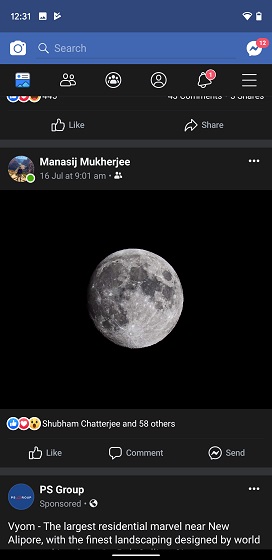
Some tool manufacturer allow darkish mode via default to the user. improves eye smoothness for the person who are sensitive to shiny light. makes it easier android programmatically force mode dark for all people to apply a device in a low-light surroundings. to allow dark mode in android, navigate to settings -> display -> topic -> darkish subject matter. In case you're a fan of a darkish mode on android, the contemporary version brings a way thru which you could pressure all apps to add a darkish subject. let's dive in to peer a few greater information on how you can enable. Force darkish. android 10 gives force dark, a characteristic for builders to speedy put in force a darkish theme without explicitly placing a daynight topic, as described above. force dark analyzes each view of your light-themed app, and applies a dark subject matter mechanically before it's miles interested in the display screen.
Apps need to decide-in to force darkish with the aid of putting android:forcedarkallowed="true" inside the activity's topic. this characteristic is set on all the system and androidx furnished light themes, which include subject. fabric. mild. whilst you use force dark, you should ensure to check your app thoroughly and exclude views as wanted. if your app makes use of a dark theme (inclusive of theme. fabric), force darkish will not be implemented. A few tool producer permit darkish mode by way of default to the person. improves eye smoothness for the user who are sensitive to vivid mild. makes it easier for anybody to use a tool in a low-mild environment. to permit dark mode in android, navigate to settings -> display -> theme -> dark theme. Within the search bar, start typing in "pressure darkish mode for web contents" till you notice it appear as an available flag. pick out the drop-down menu for "default," select "enabled," and tap the "relaunch" button to restart the browser. now websites will also use a darkish topic as nicely, as you can see below.


Komentar
Posting Komentar